Monday, 27 December 2010

HP Pavilion dv6t [Laptop Preview]


HP Pavilion dv6t [Laptop Preview]


clip image003 thumb2 HP Pavilion dv6t [Laptop Preview]

Manufacturers: Hewlett-Packard (HP)

Class: HP Pavilion

Model: HP dv6t

Price: Rs. 75,000 approx

Specs Overview:

Operating System: Win 7 Home Premium 64-bit
Processor: Intel Core i5-460M Dual Core Processor 2.53 GHz
Graphics card: Intel HD Graphics – For Dual Core Processors
RAM: 6 GB DDR3
Hard Drive: 750 GB, 5200 RPM
Battery: 6 cell, 5.25 hours max
Display: 15.6” LED
DVD-ROM: Super Multi 8x DVD R/RW with double layer support
Webcam: HP Integrated Webcam
Wireless: Intel Wireless-N card

The Looks:

The system over all has an impressive design. It’s neat and tidy without having a very flashy surface. However many users have reported the keyboard to be a little uneven and bloated in the middle.

Users who have Dell or other laptops would most probably have to get used to HP touch pads in some time because they appear to be more rigid and having some friction. Another serious issue is that many users said that the bottom of their laptop was not closed with screws properly so they had to redo it themselves. This is really irresponsible of HP but I think HP fans did not mind the flaw very much.

clip image001 thumb1 HP Pavilion dv6t [Laptop Preview]

“Runs like the Wind”:

The system is rated to be fast enough. The i5 processor along with 6GB RAM would actually run about everything. Another positive feature is that its processor comes with a turbo boost of up to 2.8Ghz. This makes it fast when you have loaded it fully with multi-tasking.

Compared to others in this price range, this machine is pretty fast.

No Recovery Discs:

The bad news is that HP will not give you any discs at all related to system support or system drivers. Even the windows 7 recovery disc that was provided earlier with the systems is now not being given out. The only solution is that you purchase DVDs after and make the recovery discs yourself. Another fact that many users might not know is that usually HP laptops will allow you to make recovery discs of its software only one time. So when you have made them, keep them safe. If you loose them, they cant be made again.

clip image002 thumb5 HP Pavilion dv6t [Laptop Preview]

“Gaming Freaks”:

Gaming freaks should know that this laptop is fine for “standard” gaming. I mean you can play games like Half Life 2 and Mafia 2 without any glitches. Intel card would obviously be missing some effects in the game play but it would still let you enjoy to a good extent. Gaming is also good because of the 6GB RAM which would support almost any game you want to play.

Similarly designing apps would also run perfect for the users. However there is a limitation in terms of resolution. You can not view resolutions higher than 1366×768.

Wireless and Blue Tooth:

A feature that has accompanied HP laptops for quite some time now is the combined Wireless and Blue tooth function. You can switch on both at a time but not one. It means if you don’t have a supply nearby and you battery is running low and you need to use the blue tooth, the wifi would also get operational with it and waste the precious energy. However this problem only affects energy deficient countries like ours.

Optional Features:

In the last review I wrote some confusion were created regarding the optional and base configuration features so in this one I would write down separately the additional features that you can get after paying the extra amount.

Touch screen: Rs. 13000
1GB ATI Graphics Card: Rs. 9000
Blu Ray DVD writer: Rs. 13000
Blue Tooth: Rs. 2500
Back lit Key Board with Finger Print reader: Rs. 2500
HP wireless mouse: Rs. 2000
HP Mobile Noise cancelling Headphones: Rs 3000
HP DeskJet 3000 Printer: Rs 2700

There are many other additional feature besides these too like upgrading processor and RAM. Another thing is that all these additional features might not be available in Pakistan, but as I said before, it is always good to import a laptop rather than buy it here.

Official Rating: 4/5

Underline:

It is excellent for office work, entertainment and gaming but if you need higher resolutions for graphics designing, this is not the system for you

Sony Bravia BX400 [Preview]


clip image001 thumb3 Sony Bravia BX400 [Preview]

  • Screen Size: 40” (102cm) (Diagonally), 16:9 Aspect ratio
  • Weight: 15.6 kg
  • Display: WXGA (1920 x 1080)
  • HDMI™ / Audio In: 2 (1 Rear/ 1 Side)
  • USB 2.0: 1 (Side) : Photo (JPEG), Music (MP3), Video (MPEG1, MPEG2 TS & PS)
  • Component / Audio In: 1 (Rear, Composite Input Common Use)
  • Composite / Audio In: 3 (1 Rear Monitor Out Common Use / 1 Rear, Component Input Common Use / 1 Side)
  • HD15 PC Input / Audio: 1 (Side)
  • Audio Out: 1 (Rear)
  • Audio Output Power: 20W (10W x 2)
  • Power Usage: 151W, <1>
  • Other Features: BRAVIA Sync, Fm Radio, Picture Frame Mode, Clock, Sleep Timer, On/Off Timer, Full HD 1080, Intelligent Picture PLUS, MPEG
  • Noise Reduction, BRAVIA Engine 3, 24P True Cinema
Out of the box:
You get:
  • The TV (Obviously)
  • User manual
  • Remote and batteries
  • The stand for putting it on tv trolleys, And brackets if you decide to mount it on the wall
Design:
Sony makes great looking stuff and the BX400 is no exception. The first thing you notice about the BX400 is the sleek design. It has a glossy finish and you are going to feel the pleasure to look at. I’ve never failed to get compliments on it whenever friends are over. The build feels solid. High marks on the design.
Display:
- Video:
Movies running at 1080p is a wonderful experience. The colors are sharp and picture clarity is good. I was concerned about whether normal cable would look good or not at such a high resolution but my worries were groundless, it looked good if not great. Normal movies however didn’t fare so well. Normal DVD’s looked bad. They seemed grainy and blurry – ones with good print were acceptable though.
So unless you’ve hooked up a player that has HDMI output or if you’re using your personal computer to play a movie, you feel kind of let down after spending so much on the TV.
Mind you, you could always watch it at its original resolution but why buy a high resolution TV if your going to do that in the first place.
- Images:
I’d run out of adjectives before i could tell you how good HD images look on the bx400. The colors were vibrant and the clarity was astounding. It also has a slideshow option as well as a picture frame mode.
Sound:
The sound quality is very good. Its clear and without distortions. The max sound is a bit on the low side though, nonetheless, I would rate it above par. It has virtual surround sound and immerses you in the viewing experience.
Connectivity:
It has 2 HDMI port for playing all those high definition movies and for enjoying your gaming consoles at maximum possible quality.
I had issues connecting my camera with the TV through USB though. Technically it should not be a problem but it was failing to read from the camera. So expect un-desired issues with cameras that are of companies other than Sony.
But if you have a card reader, its gonna be pretty smooth. Just connect the card reader to the USB port and your good to go.
The formats supported by the USB port are limited and I was very disappointed that the TV didn’t support any video format other than MPEG1 and MPEG2.
Support for divX and avi files is usually expected with such expensive devices. Converting movies to MPEG2 takes way too long. But if you do want to do that the best software to use in Any video converter Professional edition.
Features:
It has Bravia sync, which makes connecting all your Sony stuff extremely easy and hassle free. The FM radio works great. Other features include noise reduction for action packed scenes and different presets for setting the vividness of the colours on the screen.
Price:
Its priced at PKR 76,500 (Prices may vary according to your location).
There’s a free DVP SR400 DVD player bundled with it too (Deal was up and running the last time I checked with the official store). And the DVD player has divX support. So I’d recommend that you get it instead of getting a PKR 3000 discount on the TV ( Which I did, and regret now because of limited support for different video formats in the tv).
Also, old school haggling works great too, I got the TV at PKR 71,000 after some negotiating from the official Sony display center in Islamabad.
Conclusion:
The TV itself is a great buy and highly recommended. It has 1080p support so you’ll be future-proofed. But since most homes have standard cable connections which aren’t HD, make sure you get a HD media player like the WD TV Live or at least a DVD player that has divX support so you can burn movies from your PC to watch on the TV.

Online Real Time Collaboration via Google Wave – A Must Have Experience!


Online Real Time Collaboration via Google Wave – A Must Have Experience!


About a month ago I paid a visit to my marketing guru (and a very dear friend) and while we were discussing some great online entrepreneurial ideas, I told him how a couple of friends and I have been trying to arrange social media marketing and strategy workshops but we never get time to be at one place, brainstorm our ideas and plan the entire project. When I was done narrating my predicament, he told me that we don’t necessarily have to be present psychically at one place to brainstorm and collaborate. He told me to try Google Wave which is an amazing tool to collaborate in real time with team on a project and so far he had found it very useful.
So I gave Google Wave a try.
The first thing I liked when I logged in was the mail in my inbox with embedded Google Wave tutorial video (it was great help to understand what the tool is all about). Then as I started exploring Google Wave, I saw options to create a new Wave for a meeting or a brainstorm session or a new document or task tracking.
I created a new Wave by clicking on the brainstorm icon. A new sub window popped in the main window and then I added my 3 friends who I had to work with on our workshops project.
I decided that until all 3 invitees find their invitation to join Google Wave, I should write a welcome note for them and type down my ideas about the project so I started typing. The first line typed became the name/title of the wave and then after typing a rather funny welcome note to greet my friends I wrote a brief intro of our workshops project and what was to be done next.
While I was just typing my thoughts away, I saw that one of my friends had just logged in on Wave and began to write something too in the same wave. He had started sharing his thoughts and both of us began working on the plan. In the meanwhile third friend of ours logged in and all 3 of us were typing and throwing our ideas at each other at the same time from the comforts of our homes.
The best way to describe Google Wave experience is that it is a combo of email and online chatting yet in a more visually pleasant and rich media format.
You can drop images, videos, attachments in the wave, use rich text, add links to the discussion, edit documents and what not but the best part is that it gets saved as one big mail message so you don’t have to worry about losing all the million dollar brainstorming you have done with your team on any project.
My experience with Google Wave is still underway as I am happily working on my project with my friends by collaborating with all of them in real time from the comforts of our own homes.
If you haven’t tried this fun and such an effective communication and collaboration tool by Google yet then you must give it a shot at least once. I bet you won’t be able to keep yourself off of it and you will be planning all your events and projects on Google Wave from then on.

Sunday, 26 December 2010

Microsoft has Released Urdu Language Pack for Office 2010


Microsoft has Released Urdu Language Pack for Office 2010


If you are using Microsoft Office 2010, and you have to do that in Urdu, Pakistan’s national language, then you are good to download this latest Microsoft Office 2010 Language Interface Pack from Microsoft Download Center: Link: Click here
Following programs are supported under Microsoft Office Language Interface Pack 2010:
  • Microsoft Office Excel 2010
  • Microsoft Office OneNote 2010
  • Microsoft Office Outlook 2010
  • Microsoft Office PowerPoint 2010
  • Microsoft Office Word 2010
If you are looking for a genuine copy of Office 2010, or other Microsoft product, point your browsers to this link to purchase your copy!

Internet Explorer 9 Offers Family Safety

Internet Explorer 9 Offers Family Safety


Internet Explorer 9 Offers Family Safety


The Internet can be a wonderful source of knowledge and information for children. They can use it to research educational reports, communicate with teachers and their classmates and play interactive games. A child who is old enough to press a few letters on the keyboard can literally access the world but at the same time he is vulnerable to the online predators.
In continuation of its “Online Children’s safety” programme, Microsoft held the second awareness workshop on internet safety in collaboration with Inbox, their cause partners.
The main purpose of this effort is to create awareness among the parents and teachers to ensure safer use of internet by children. Microsoft has made the usage of internet safer by simplifying and improving the tools they offer, such as Internet Explorer 9, which includes smart screen filters and other built-in security features. These protect users against deceptive and malicious websites which can compromise user data, privacy and identity.
It is important for parents to be aware of what their kids are accessing on the Internet. Just like any safety issue, parents should share their concerns regarding the risks of online surfing with their children and keep a close eye on their activities. Parents can ensure online safety of their children through supervision with the help of technology and skills.
“With the increasing trend of social media and wider use of internet by children, there is a strong need for protecting them when they go online. On the one hand, it is very beneficial for a child to use technology as a resource for education and knowledge but on the other, the threat level rises since criminal elements use both technical and social engineering to mask their intent. Compounding the problem, parents and other caregivers are often unfamiliar with the child safety software tools available to them. Microsoft is committed to doing its part to contribute to the safety toolbox,” said Kamal Ahmed, Country General Manager, Microsoft Pakistan.
Admiring the initiative by Microsoft, Chaudry Faisal Mushtaq, Director, Roots School System, said “Internet is a significant tool for children to help them in their studies and to know about the world. Children cannot and should not be stopped from accessing the internet or from using the computer but the need is to develop and share certain rules, do’s and don’ts with the kids. I would take this opportunity to thank Microsoft for the capacity building of Roots School System and appreciate this initiative which is really need of the time. “
The event was attended by parents, teachers, media representatives, researchers and leading technology experts who were educated about the safety options provided in Microsoft Internet Explorer 9.

Enjoy!!!

Now Pay Wateen Bills with Easypaisa

Wateen now gives you the flexibility to pay your Wateen bills through easypaisa bill payment facility.
Wateen and Telenor Easypaisa customers can enjoy the convenience of paying their bills anytime, anywhere from their easypaisa mobile account or by visiting any easypaisa shop, Telenor Franchise, Telenor S&SC or any branch of Tameer Bank.
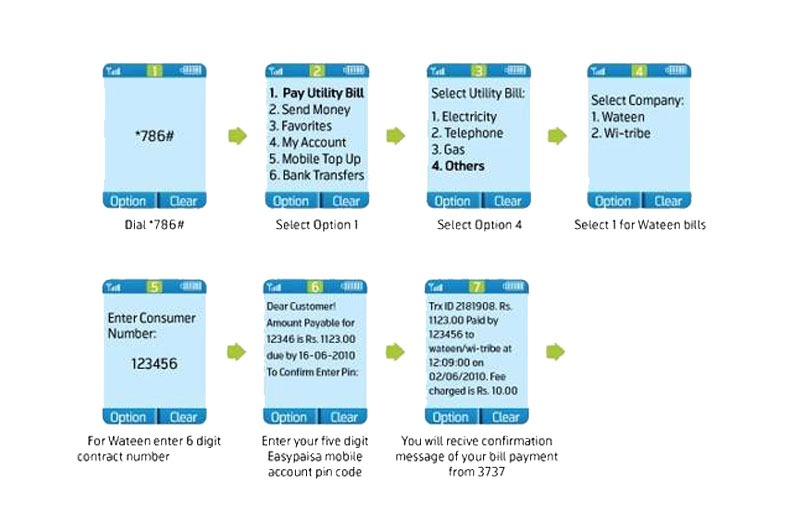
How to use the service
1- Though Easypaisa outlet: Simply visit any easypaisa shop, Telenor Franchise, Telenor S&SC or any branch of Tameer Bank to pay your Wateen Bill.
2. Through easypaisa mobile account:
epa thumb Now Pay Wateen Bills with Easypaisa
Note: Don’t forget to provide your unique Customer ID given on the selfcare portal

Mobilink Stands Exposed


Vultures of corporate world have their own ugly dimensions. They love carrion and mainly thrive on meek and downtrodden. An apt demonstration of this dictum reflected today when I came across a helpless guy who had come all the way from Lahore with his family and since then become a rolling stone in Federal Metropolis.
Grieved and appalled on this luckless man I sat beside him in the open in this biting cold with his little children. The man told me his name is Ahmad and he was compelled to come here as Mobilink had been dilly dallying his payment of more than two million for the last three years. This person ran a small company Fair Deal Services and possessed all the documentary evidence in support of his claim. He narrated his contacted all ‘people-that-matter’ in Mobilink but what he got in response were merely some words of sympathy and hollow promises.
Video Interview with the Protester and Mobilink Officials:


The bosses in Mobilink had now even stopped taking his phone calls. Things got worse for himand he finally moved to Islamabad with his family which resulted in additional expenses to him as his economic condition had already been fragile due to non-payment. When he put up banners and placards and sat in front of their office Mobilink people called him inside and tried to convince him to take only half payment i-e a mere 1.1 million but he refused to take that unless his genuine payment was not released. He also deplored that the company did not offer any food or water to him or his family despite spending days after days outside their office. He also requested CJ Supreme Court to take Suo Motto notice of this injustice done to him.
Now my question to this Telecom Company is simple: Instead of hoodwinking people in the name of CSR initiatives, why doesn’t it pay to those whom it owe hefty sums of money? Projecting CSRs is nothing but an attempt of hoodwinking people.

what is Juice Jacking SCAM

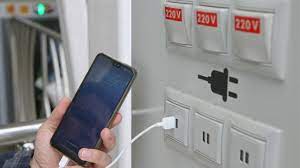
  Juice Jacking is a cybersecurity threat that occurs when cybercriminals manipulate public charging stations, such as USB charging ports in...