Monday, 5 November 2012

10 ways to help your users switch from Windows to Mac


Computer platforms sometimes mimic political affiliations or religious beliefs: Practitioners and advocates may become narrow minded, inflexible, and intolerant of competing perspectives. Nevertheless, many organizations — some aided by platform independence fueled by cloud-computing initiatives — determine to branch out, and for a variety of reasons, begin replacing Windows systems with Macs. The following 10 tips will help organizations in migrating Windows users to Macs, while simplifying the transition.

1: Explain OS X differences

The OS X operating system, and user interaction with the platform, is quite different from Microsoft Windows XP, Vista, and 7. While Microsoft is making strides to catch up to Mac with improvements included in Windows 8, most Windows users are familiar with the need to navigate to applications or preferences by clicking a Start button and following a concourse of menus. Not so in OS X, which makes application access as easy as performing a simple gesture. (More on that in a moment with the Launchpad section.)

Windows users are typically accustomed to purchasing software applications in a box or surfing a variety of manufacturer Web sites to load programs (hoping they reach the actual intended site and not a fraudulent or phishing source). But OS X’s App Store integration simplifies the process when moving to Macs. Microsoft is only catching up with its Windows 8 release.

Users new to the Mac should also be given an overview, if brief, explaining how OS X is powered by UNIX, an OS widely held to be a more stable, more reliable, and more secure code base than is found in Windows. They will need to understand that common commands and common program extensions used in Windows are different. For example, Mac users will look for .dmg files instead of .exe extensions when installing software.

2: Describe the Dock

Windows users are familiar with the Taskbar, which typically appears at the bottom of the Windows screen and provides access to the Start button, commonly used applications, and other items, including the Windows System Tray. OS X’s Dock provides a customizable menu from which common applications and folders can be accessed, as well as System Preferences, the Launchpad application console, the Trash bin, and the Finder file system window.

Former Windows users accustomed to moving the Windows Taskbar to the left or right sides of their screen should be shown how to select the alternative left- or right-side positioning from within the System Preferences’ Dock console. Windows users who favor the Taskbar autohide can use the same setting for the Dock. Just show them how to open System Preferences, choose Dock, and select Automatically Hide And Show The Dock. They can adjust other Dock features using the same System Preferences window, including size, magnification of highlighted icons, and animated Windows minimization settings.

3: Discover Safari

As soon as users are introduced to the Mac, shown how to log on, and become familiar with the new interface and Dock, the first activity most will want to perform is connecting to the Internet. Assuming a network administrator has already implemented Internet connectivity, you can show them how to open Safari, Apple’s stand-in for Internet Explorer. Most Web browser-accessed, cloud-based applications are compatible with Safari.

Just as Internet Explorer supports tab-based browsing, so too does Safari. But with the addition of Apple’s iCloud service, Mac users can synchronize bookmarks, reading lists, open tabs, and more across numerous systems (including with Internet Explorer on Windows computers).

4: Practice Mail, Calendar, and Contacts Use

Once users are surfing the Internet, the next typical request is to send and receive email. Using Safari, Mac users can access Microsoft Exchange-powered Outlook Web Access sites and use Web-based interfaces for POP3 and IMAP email accounts. But many users will prefer to enable integration with OS X’s built-in Mail program. Reached by default from the Dock, Mail is set up similar to other email clients. (New accounts are added by selecting Preferences and clicking the + icon found on the Accounts pane.) It provides support for Exchange, POP3, and IMAP mailboxes. Apple also offers a Mail Setup Assistant to simplify the process.

OS X’s native Contacts and Calendar programs are easily linked to Mac servers and Microsoft Exchange servers, too. Users’ existing accounts are configured within the Mail, Contacts, and Calendars console within System Preferences. Once a user’s account is linked to a corporate or third-party hosted server, contacts, appointments, email, and even tasks and to do lists items will begin synchronizing on the Mac just as they did on Windows.

5: Connect to SMB shares

Your Mac users will probably need to access network shares, folders, and files hosted on other systems. While Apple makes it easy for Macs to share files with other Macs (Apple’s posted a quick 101 review here), often the target shares and files are hosted on a Windows workstation or server. Fortunately, authorized users can access such files quickly and easily.

The Windows connection process, also documented by Apple on its Web site, requires Mac users to open Finder (found on the Dock), click Go, select Go To Server, enter the host address (such as smb://FS01 or smb://192.168.1.2) into the Server Address field, and click Connect. They’ll be asked to enter an authorized username and password to connect to the target share. Upon providing proper credentials, they will be connected to the network share. The network share is then mounted as a directory that’s easily accessed from within the Mac’s Finder window.

6: Review Launchpad

Smartphones have taught users that accessing a program or application should be as easy as touching the application from within a primary display. Most users now know just to tap an application to select, access, and open the program. Apple brings such functionality to the computer desktop via Launchpad. Using a simple gesture (three fingers down and thumb up) on an Apple Trackpad or clicking Launchpad opens the OS X app. Each application appears as a single icon on the full screen display. Users just need to click an icon to launch the application. While the feature is now old hat for Mac users, Windows users (other than those who’ve already adopted Windows 8) will be unfamiliar with the practice on a laptop or desktop computer.

7: Explore the App Store

Software selection, installation, and maintenance processes are changing. Historically, store-bought software or volume-licensing agreements were implemented within Windows environments, requiring corporate IT departments to develop, purchase, allocate, install, activate, distribute and configure, and then maintain and update software. Apple’s App Store innovation, first popularized on iPhones and iPads, rapidly spread to the OS X interface and is now changing the way business organizations select, deploy, and maintain software applications.

Users should be aware of the organization’s official method for purchasing and deploying applications, such as Pages, Keynote, Numbers, photo- and video-editing programs, social media utilities, and other tools. Whereas some firms use a corporate iTunes account, others may have deployed a private app store. By making sure your users are taught the proper method for accessing applications, all software deployment and maintenance tasks will remain standardized.

8: Change settings using System Preferences

Just as in Windows environments, Mac administrators can use policies to restrict the changes users can make to system settings and configuration. When helping your users make their own changes, OS X’s System Preferences should prove less confusing than its Windows counterpart, Control Panel.

Apple enables meticulous customization of the OS X interface, yet it simplifies the process. Preference menus are clearly labeled. Radio button options are intuitive. Check box selections make sense. Common tasks, such as adjusting display settings or fine-tuning mouse or Trackpad configuration, are straightforward.

A quick tutorial of System Preferences should include brief reviews of the Desktop & Screen Saver, Dock, Notifications, and Displays apps — four elements most users will want to customize to match personal preferences.

9: Install printers

Although most offices are printing fewer pages, users must print occasional email messages, documents, spreadsheets, presentations, Web pages, and other material. Whereas Windows’ printer installation can test even the most seasoned technician’s patience, Apple’s Bonjour service performs admirably, locating available printers and installing the proper drivers. Even so, new users to the OS X platform may need help installing network printers and printing from within common applications (hint: Just press the Command and P keys simultaneously), and changing printers.

10: Load Microsoft Office

When everything is said and done, many businesses use operating systems for little more than connecting to the Internet, handling email, and running office productivity applications. Microsoft commands an overwhelming market share of office tools, and for good reason.

Fortunately, Microsoft Office for the Mac is available to Windows users making the transition to OS X. Installing Microsoft Office applications — namely Excel, Outlook, PowerPoint, and Word — on OS X provides former Windows users with the familiarity (and compatibility) of these ubiquitous productivity applications. Users will find the OS X interface for these tools slightly different from the Windows versions. But the functionality, file formats, and views will be familiar, so new Mac users should soon be working up to speed.


Thanks & Regards,

"Remember Me When You Raise Your Hand For Dua"
Raheel Ahmed Khan
System Engineer
send2raheel@yahoo.com
send2raheel@engineer.com
sirraheel@gmail.com
send2raheel (skype id)

My Blog Spot
http://raheel-mydreamz.blogspot.com/
http://raheeldreamz.wordpress.com/

My Face book pages
http://www.facebook.com/pages/My-Dreamz-Rebiuld-our-nation
http://www.facebook.com/pages/Beauty-of-islam
http://www.facebook.com/pages/Health-is-wealth

Sunday, 4 November 2012

Apple iPhone 3G


The iPhone 3g is developed by Apple Inc. and is manufactured by Foxconn. It is released on July 11, 2008. The popularity of the iPhone 3g can be accessed by it sale as one million units were sold during the first weekend of its introduction. It came with the slogan ‘Half the price, twice the speed’ and sold like hot cakes. Its distribution is stopped after the release of iPhone 3gs and now software update is provided by Apple however operating system from third party software are available.

Incredible Iphone 3G Specifications

Weight & Size: It is available in the size of 115.5 / 62.1 / 12.3 dimension and its weight is 133gm.

Upgraded Frequency Band:   The iPhone 3g, the second generation mobile, comes as an improvement to its predecessor and is worked on the frequency of GSM 850 / 900 / 1800 / 1900. It is upgraded to 3g network capable of having frequency of HSDPA 850 / 1900 / 2100.

Upgradable OS:It has OS 2.0 accessorized with App. Store, MobileMe, one click email access and bug fixing facility. It was upgraded in a year to OS 3.0 with MMS, copy/paste and novel feature of dual orientations; portrait or landscape.  

Battery:A plus point is its battery that is capable of stand by for more than 300 hrs or gives talk time of 10 hrs or supports music for 25 hrs to play.

Processor:Apple iPhone 3g has CPU of AM 11 that is under locked to 412 MHz supported by Power VR. It has GPU of MBX-Lite for 3D graphics.

Memory:It has a farcical memory of  8GB / 16 GB storage capacity with 128 MB RAM. 

Fabulous iphone 3G Features

Apple iPhone 3G comes with 16 GB virtual memory and with much more added features like faster web browsing, email correspondence, compass and ease of watching video. The best thing about iPhone 3g is that it is possible side by side at the same time while making a call.

Screen & Color:          The iPhone 3g has a capacitive touchscreen and is available only in two colors white and black.

Internet:           The internet is available through GPRS, EDGE and 3g HSDP. It also catches the signals through Bluetooth 2.0 with the support of headset only. It provides internet through WLAN functional on the WiFi 802.11.b/g.

WWW: iPhone 3g is subjected to HTML Safari for web browsing activities. This gives an exciting experience to its user to search and explore the web while on the go. It helps the user to make impressive document by searching and researching the topic extensively through web. 

Cheap Communication Gadget:         The iPhone 3g makes the communication cheaper with the hype of speed. It enables threaded texting and MMS exclusive feature which was not available in previous version. It records voice memo and has integrated hands-free option. 

App. Store:      A very useful feature is the availability to access the App. Store through iPhone 3g. Millions of games and other applications are available on App. Store that can be either downloaded free or paid as per the nature of Application. 

Camera:          Apple iPhone 3g has very ordinary camera of 2 mega pixels with only 1600 / 1200 pixels zooming.

Recreational Tool:       It features iPod with audio / video player. It acts like TV supporting by an output. It is accessorized with a jack for headset of 3.5mm.

Editor: It helps to browse and edit photos and these photos can be used in caller directories for id, desktop or screen savers. These photos can be easily MMS and can shared the cherished moments with your loved ones. 

Thanks & Regards,

"Remember Me When You Raise Your Hand For Dua"
Raheel Ahmed Khan
System Engineer
send2raheel@yahoo.com
send2raheel@engineer.com
sirraheel@gmail.com
send2raheel (skype id)

My Blog Spot
http://raheel-mydreamz.blogspot.com/
http://raheeldreamz.wordpress.com/

My Face book pages
http://www.facebook.com/pages/My-Dreamz-Rebiuld-our-nation
http://www.facebook.com/pages/Beauty-of-islam
http://www.facebook.com/pages/Health-is-wealth

Apple iPhone 4G - iPhone 4G Features


iPhone 4G

Apple’s iPhone 4G launched couple of months ago and iPhone 4G is one of the hottest talk of the town. Everybody is interested to know about its features, it’s plus and minus points. Everywhere, whether in universities, colleges, cafĂ©’ or clubs etc. iPhone 4G topic is the most favorite one.

Steve Jobs introduces this new IPhone 4G with nearly hundred of new features. Claimed by Gizmodo the epitome of iPhone, this iPhone 4G has some totally new and useful features which are really welcomed by the new generation as fulfilling their need of the hour.

Take a closer look of this iPhone 4G model you will find these characteristics;


Stainless steel body
Glass top
exceptionally thin
side buttons for volume controls
easily approached sim-tray
camera on front with microphone on the back
top second microphone for noise control
button for sleep or wake mode
headset input

No doubt all the above mentioned characteristics of iPhone 4G are appealing and are the main reason for its popularity. Jobs focus is on the all round steel band which is actually the reason of beguiling. Jobs point of view is that this steel band works as the antenna of the phone. All the wireless based functions in iPhone 4G are supported by the antenna.

iPhone 4G Features

A brief glance of this iPhone 4G mobile will surely excite you and you would like to know about iPhone 4G features.

iPhone 4G Display

Retina display is an extraordinary feature conceived from human eye incorporate into iPhone 4G. It increases 4x the density of the pixel which is equal to the LCD’s typical 326 pixels display. It has a display of 3.5 inches having the resolution power of 960 x 640 pixels greater than a human eye’s potential while holding at 10 – 12 inches away. This retina display feature of the iPhone gives it a look of a book page instead of a grid appearance.

iPhone 4G Processor

The Iphone 4G has an A4 processor. It increases the power back up many times as compared to other mobile phones. It improves the functionality and time period of talk time, networking hours, web browsing. Apple rename the iPhone OS into iOS 4 as this iPhone support multitasking like that of iPhone, iPad, and iPod. At a time one can enjoy music while checking combined inbox, shuffles the folder at home screen, play game. 

iPhone 4G Really a stunning improvements!

Addition of gyroscope for mobile gaming is an attractive feature of iPhone 4G for the game-lovers in.

iPhone 4G Camera

IPhone 4G has a 5 – mega pixel camera having sensor at its back for illumination. This sensor captures an increased amount of light which gives good quality photographs especially in case of darkness. iPhone 4G supports editing and sharing of videos. Music can be added to the movies as well.

Internet on iPhone 4G

Microsoft’s search engine, Bing, has an option of being a default search engine of iPhone 4G. Still Bing or yahoo is not replacing the Google default search engine.

Special Features of iPhone 4G

A very special feature of iPhone 4G is a facility of downloading iBooks without any extra charges which are specially prepared and announced for the iPhone. Now publishers have a new market in front of them.
IPhone provides a platform for the iAds which promotes the better prospects for iAds developers. This will not interrupt the application in-use and still broadcast. On the other side it is a great opportunity for the advertising companies to revolutionize their medium.

iPhone 4G Video Calling

Now it is possible to do video calling with iPhone 4G. Enabling the picture – in – picture both side cameras can be used simultaneously. So you can do Face Time calls also the switching of camera to whether rear mounted or front facing camera.  

Thanks & Regards,

"Remember Me When You Raise Your Hand For Dua"
Raheel Ahmed Khan
System Engineer
send2raheel@yahoo.com
send2raheel@engineer.com
sirraheel@gmail.com
send2raheel (skype id)

My Blog Spot
http://raheel-mydreamz.blogspot.com/
http://raheeldreamz.wordpress.com/

My Face book pages
http://www.facebook.com/pages/My-Dreamz-Rebiuld-our-nation
http://www.facebook.com/pages/Beauty-of-islam
http://www.facebook.com/pages/Health-is-wealth

iPhone 4S, Features & Specifications


iPhone 4S

Between the launch and handling of iPhone 4, although hype attached to iPhone was much reduced yet craze for more remains there always and associated with Apple till Steve Jobs here. Not possible to predict about future but yes Steve jobs always exploded bomb shell among the masses. iPhone 4S is not an exception. It also has some pomp-pomp attached with it like the most notable feature Siri software for voice controlled.

The iPhone 4S is surely a hand on its predecessors having unique specifications and amazing features. Its A5 processor, improved signal strength and camera quality and hardware modifications are all stunning.

iPhone 4S Specifications

Size: While compared to iPhone 4, iPhone 4S has 4.5 inches height, 2.31 inches width, and 0.37 inches depth makes it more smart, light weight and attractive. It weighs 140 gm and is much lighter than all the Smartphone available till now.

Network: It is called World phone having two standard GSM and CDMA. UMTS are operable at 850, 900, 1900 and 2100 MHz whereas GSM / EDGE workable on 850, 900, 1800, and 1900 MHz.  It is also WiFi enabled with the standard 802.11 b/ g / n. Bluetooth 4.0 wireless technology is also has access.

Display:  Like its predecessor, it also has retina display allows multi touch having 960 x 640 pixels. This display eases the watching of off time show by downloading it. 

Camera: After experiencing problem in iPhone 4, camera is introduced with much more quality and high definition picture. 8 – mega pixel camera is capable of auto focusing and enable tap to focus. And allow face detection in still images. It has LED flash capable of recording HD video with audio as well as front camera with VGA snap quality.

Battery: It has built in battery to recharge and is rechargeable through USB port. It give talk time of nearly 8 hr / 3G with standby time of 200 h. Internet can be used for 6 hr and audio / video 40 / 10 h.
   
iPhone 4S Features

There are some attractive feature also pack in iPhone 4S that compel the users magnetically. These features are incredibly worthy and a source of fun and knowledge.

Email Attachment: Attachment is possible in multiple of formats with email. Push Email exclusive feature is available with attachment support.

System Demand: Original Apple ID to access some of the hot features, also internet access and synchronization of iTunes requires through PC. It runs on MAC, PC with Windows 7 and download access to iTunes.

Personal Assistant Software (Siri): Siri is the marketing hot keyword to attract the iPhone users to upgrade their iPhone 4 to iPhone 4S. The Siri software take different little assistance from other and facilitate us like a remote control in our hand. Siri can explore the iPhone on the command prompt by the user. Google is the competitor but Apple has the lead to be the newest one. Siri allows you to prompt a command. Siri is interesting software that can tell you how to carry a command on phone. Your phone will certainly reply to your command.

Like iPhone 4 it is also available in two specific colors; white and black. The iPhone 4 S is super luxury accessory that is doing miracle in nearly every field like TV, radio, technology, medical etc. etc. etc. 


Thanks & Regards,

"Remember Me When You Raise Your Hand For Dua"
Raheel Ahmed Khan
System Engineer
send2raheel@yahoo.com
send2raheel@engineer.com
sirraheel@gmail.com
send2raheel (skype id)

My Blog Spot
http://raheel-mydreamz.blogspot.com/
http://raheeldreamz.wordpress.com/

My Face book pages
http://www.facebook.com/pages/My-Dreamz-Rebiuld-our-nation
http://www.facebook.com/pages/Beauty-of-islam
http://www.facebook.com/pages/Health-is-wealth   

Saturday, 3 November 2012

What is Android?


Android

There are different mobiles and computers operating systems like different models of computers and mobiles. Android is one of the operating systems using by the smart phones. Android is not simply an operating system rather hardware and programming languages are also use this Android Technology.

Android was invented by an anonymous company but later on Google has taken its copyrights reserved and is now doing further development in this technology. It is Linux based technology that uses Unix as an operating system. Linux is the most recent technology in the field of communication and computing. It is therefore Android is demanded by most of the users to have it their operating system.  However it is also a fact that Google is offering an open choice for the users to modify and add any new application without even bring on the notice of Google. Anyone can upload a new application on the Android platform as App Store to either free or payable. These application uploads by the users can be easily download by the users and enjoy more features like additional games, interactive media and business plan.

Android technology is open to use by anyone who wants to develop applications as it promotes the user to add new ideas by using the programming code accessible by them. The flexibility of Android technology makes it more convenient to the operating system to have this as a base for smartphones. The only requirement is software development kit availability to bring any change in it.


There are two common versions of Android as one is cupcake in which sliding physical keyboard is present in the phone and second is HTC EVO which is totally touch screen operable. It allow user to physically contact the touch screen to perform different functions. Android avoids multitasking yet interface is quite good and user friendly.

Thanks & Regards,

"Remember Me When You Raise Your Hand For Dua"
Raheel Ahmed Khan
System Engineer
send2raheel@yahoo.com
send2raheel@engineer.com
sirraheel@gmail.com
send2raheel (skype id)

My Blog Spot
http://raheel-mydreamz.blogspot.com/
http://raheeldreamz.wordpress.com/

My Face book pages
http://www.facebook.com/pages/My-Dreamz-Rebiuld-our-nation
http://www.facebook.com/pages/Beauty-of-islam
http://www.facebook.com/pages/Health-is-wealth

Friday, 2 November 2012

What is 4G Network

With the advent of Wireless technology there opens a new door to the communication standard. 4G is the fourth level of the wireless generation. The implementation and access to the 4G network is still in it development stage. All the giants of mobile industry and tech engineers are busy to research and devise it with full confidence. The specification under consideration is the high speed for the data transfer with online security. 4G Networks will hopefully come into the field with the promises it is making with the customer of speed and security.

4G network or wireless communication is not a new terminology as 1G, 2G & 3G are already in the market and has been used by the people since 1980. All generations have their particular traits to attract the user for its use. 1G is the first complete wireless standard removes the fuss of wiring and per channel 1 user.  The lodging of multi user in one channel becomes possible when 2G comes with improved version after a decade (1990) of 1G. 3G revolutionized the concept of internet. 3G is the 21st generation network and is enjoying its privilege. The successor of 3G is now its way of implementation and is known as 4G. The video facility and speed which is introduced by 3G will be the true essence of 4G. It promises all basic features together with high speed.

The ITU has laid down the specifications for the 4G standard and if it will meet the criterion set by International Telecommunications Union then it will recognized because already different improved versions are introduced but nominated as 3.1 – 3.9 G. 4G network is heading towards a new dimension in the field of wireless technology. Its first step is the provision of quality service to its clients. Second point is the refine signals for reliable communication with no fear of data loss.

4G will make sure that the information should be passed along with authentication. An enhanced experience will be provided by the 4G network for audio / visual and other multimedia services. Speculations are that 4G will come up with ultimate speed of 100 mega bits per second. It is also specifies on behalf of ITU that will facilitate interactive roaming everywhere.

Above are the specifications processed by ITU while different technological groups are also placing suggestions as how to improve 4G network. Their first suggestion is the WiMax privilege as compared to any other wireless protocol. Their second recommendation is the data transfer in packet mode having specific IP. It is hopefully would be the fastest wireless network ever experienced by the users.

A special characteristic given to 4G network is the transmission through antennas which will make it possible to communicate within an organization reliably. A new technology in this response is introduced in the field with the name of special multiplexing in a series form that will be possible between one transmitter and receiver. Antennas are considered as the fastest mode of communication.


Thanks & Regards,

"Remember Me When You Raise Your Hand For Dua"
Raheel Ahmed Khan
System Engineer
send2raheel@yahoo.com
send2raheel@engineer.com
sirraheel@gmail.com
send2raheel (skype id)

My Blog Spot
http://raheel-mydreamz.blogspot.com/
http://raheeldreamz.wordpress.com/

My Face book pages
http://www.facebook.com/pages/My-Dreamz-Rebiuld-our-nation
http://www.facebook.com/pages/Beauty-of-islam
http://www.facebook.com/pages/Health-is-wealth

How 4G Technology Works


As the need for communication rather fastest communication is the foremost priority of present era also the need of quick data transfer. Distant business correspondence by sharing data becomes very important. Ever growing technology is the example of one such step towards the fastest transmission of data. 4G stands for Fourth Generation is the latest technology with high speed transferability of data with security measurements. It is coming with wireless broadband for the instant download.

Talking about the standard of 4G technology, still not defined as set standard, two technologies are supposed to be the based features of 4G.

    WiMAX

    LTE

ITU promotes the technologies against the defragmentation and incompatibilities in 4G technologies.

WiMAX stands for Worldwide Interoperability of Microwave Access previously worked as fixed wireless facility under the 802.16e band. Now the modified standard 802.16m has been developed with the properties of speed, wide spectrum, and increase band.

4G has an advantage of having the WiMAX as a product because IEEE introduces and releases it already therefore economic as no need to pay for its manufacturing price. 4G supports two basic equipments;

    WiMAX Network system (network infrastructure)

    mobile phone set

Smartphones with Wireless Access are going to be introduced in the market are the model 4G mobiles. These smartphone are equipped with the wireless internet accessibility and no fear of losing connection while travel from one tower to another tower range.


Based on the IP wireless connectivity, it increases the optimization for the internet. It manages the voice through packet-switching instead of circuit switching. Internet connectivity with specific IP not only increases the speed but also reliability of the sending and receiving of data.


During a phone call when caller send the information by connecting to WiMAX network, this information first processed to the internet home and then spread widely. Most of the time this transmission happens very fast problems arise in case of spectrum, bandwidth and data. In case spectrum is not wide, shorten bandwidth and specific data carries through the internet. Arrival of 4G has diminished all the fears of lower bandwidth, narrow spectrum and amount of data send / receive. This WiMAX technology has a high speed of data transfer rate with additional capacity for the subscribers and ready to carry big amount of data. Previous generations were suffering because of low speed which ultimately covered in the 4G.

Parallel to WiMAX, LTE (Long Term Evolution) is introduced by Verizon. LTE is considered to be promising high data transfer speed. LTE is supposed to provide internet facility using both systems. It has the ability of transition from one mode to another. LTE is developed on radio waves technology. This not only increases the speed but also the amount of data allowed through the same bandwidth and results into lower cost.


As LTE is compatible with 3G technology so it not only increases the speed but also prevents the need of new network and can work through the same infrastructure. LTE will not only support the functions of 3G but also incorporate some newer ones. LTE is using MIMO (Multiple input multiple output) able to send and receive huge data negative in the sense that it will overload the base stations networks.


While seeing the working methodologies of both technologies considered to be the standards of 4G, the future is of mobile business.

Thanks & Regards,

"Remember Me When You Raise Your Hand For Dua"
Raheel Ahmed Khan
System Engineer
send2raheel@yahoo.com
send2raheel@engineer.com
sirraheel@gmail.com
send2raheel (skype id)

My Blog Spot
http://raheel-mydreamz.blogspot.com/
http://raheeldreamz.wordpress.com/

My Face book pages
http://www.facebook.com/pages/My-Dreamz-Rebiuld-our-nation
http://www.facebook.com/pages/Beauty-of-islam
http://www.facebook.com/pages/Health-is-wealth
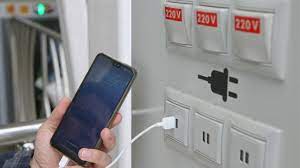
what is Juice Jacking SCAM

  Juice Jacking is a cybersecurity threat that occurs when cybercriminals manipulate public charging stations, such as USB charging ports in...