Saturday, 4 February 2012

Hands-on with Node.js support in Komodo IDE 7


ActiveState has released a major new version of the Komodo integrated development environment (IDE). The update, which is called Komodo 7, introduces several useful new features and support for additional programming languages.

Komodo is a high-end commercial development tool for programmers who work with scripting languages such as Python and Ruby. It's especially well-suited for developing large-scale Web applications. It supports code completion and breakpoint debugging for a relatively broad number of programming languages.

Komodo is built on top of Mozilla's Gecko rendering engine with the XUL user interface toolkit. Some of Komodo's underlying architecture is inherited from Firefox, including a rich add-on system. The core editing components of Komodo IDE are developed as open source software and are shared with a free standalone editor called Komodo Edit that lacks the IDE's debugger and other advanced functionality.

Some of the major new features introduced in Komodo 7 include support for real-time collaborative editing on code files, a new built-in profiling tool for Python and PHP, a much-improved syntax checker, and the ability to synchronize your settings between computers. Alongside these new features, Komodo 7 also adds support for several new programming languages and frameworks, including CoffeeScript and Node.js.

I haven't had a chance yet to try all of the new features, but I put the new Node.js functionality to work during some hands-on testing. Komodo's Node.js support isn't as mature or robust as its handling of other languages yet, but it still proved useful for Node.js development.

The built-in debugging support for Node.js is fairly comprehensive and well done. In addition to showing you the value of your watch expressions when you hit a breakpoint, it will also show you a tree of all the variables within the current scope. You can expand data structures and objects to see their contents. When you use the debugger to step into an expression, the IDE can find and display the function you have stepped into even if it is in another module.

Komodo's newly improved syntax checker is useful and very functional. It picked up errors in my JavaScript code, such as unmatched parentheses and missing operators, almost instantly. It will tell you the line and column and take you to the right place when you click the entry in the error panel.

Komodo's code browser, which gives you a visual overview of the functions, objects, and variables defined in the currently active file, works relatively well with JavaScript. It's not as useful as it could be for Node.js development, however.

Due to the event-based nature of the framework, a lot of code in Node.js applications tends to be implemented inside of callbacks. This means that you end up with a lot of indistinguishable anonymous functions in the Komodo code browser. In cases where you have an anonymous function bound to an EventEmitter signal, I'd prefer to have the code browser show the event name. That issue aside, the code browser is still quite good for Node.js programming when you are working with more conventional JavaScript.

The major weak area for Node.js support in Komodo 7 is its code completion. In order to get code completion on libraries, you have to manually configure the IDE so that it knows the paths of third-party modules that you want to use. It is supposed to be able to scan other files in your project by following the require statements, but it seemed to have difficulty doing so with the trivial project that I used for my testing.

There are many other nice things about Komodo that I haven't touched on in this article but are worthy of praise, such as its deep extensibility, excellent Vim emulation mode, and thoughtfully unobtrusive approach to project management. Those characteristics and broad language support are the reasons why we have historically given Komodo our stamp of approval (we even included it in a gift guide once).

The new version builds on all of those strengths and continues to introduce useful new functionality. The Node.js support is a welcome addition, but still needs further work before it will be as strong as the IDE's existing support for other languages.

The Komodo IDE is currently available for $245 from ActiveState on sale. At that price, it probably isn't going to be practical for users who are just looking for a dedicated Node.js development environment. Komodo remains a good value, however, for professional developers who work on large projects and regularly use several of the programming languages supported by the IDE.

Thanks & regards,

"Remember Me When You Raise Your Hand For Dua"
Raheel Ahmed Khan
System Engineer
send2raheel@yahoo.com
send2raheel@engineer.com
sirraheel@gmail.com
send2raheel (skype id)

My Blog Spot
http://raheel-mydreamz.blogspot.com/
http://raheeldreamz.wordpress.com/

My Face book pages
http://www.facebook.com/pages/My-Dreamz-Rebiuld-our-nation/176215539101271   
http://www.facebook.com/pages/Beauty-of-islam/223983470988333?sk=wall               
http://www.facebook.com/pages/Health-is-wealth/289486761065829?sk=wall 

Thursday, 2 February 2012

windows phone 8


The website Pocketnow has come out with some exclusive details about Windows Phone 8 - the next version of Microsoft's Windows Phone Operating System.
Hardware

Windows Phone 8 or Apollo is rumored to be adding support for multiple processors, more screen resolutions (rumored 4) and removable MicroSD storage capabilities. In addition, Microsoft is reported to be racing to include NFC functionality and tap to share capabilities.
Integration

This is the main selling point here.

    The kernel, networking stacks, security, and multimedia  areas will see heavy overlap with the Windows 8 client. This should allow developers to resuse substantial amounts of their code.
    Microsoft is reportedly scrapping Zune integration (obviously).
    There will be extended integration with not just the Xbox but with the Windows 8 client and Skydrive.

Some other choice quotes:

    One of the main highlights of the overview was a feature called DataSmart, which aims to reduce, and simplify the tracking of, data usage. Besides providing a breakdown of data consumption, as other platforms already do, Windows Phone 8 will actively attempt to give Wi-Fi connections precedence, going so far as to automatically connect to carrier-owned WLANs when in range. To that end, the Local Scout feature of Bing Maps will enable the real-time location of nearby hotspots. Data usage will also be made glanceable thanks to a live tile.

    Perhaps most interesting is Windows Phone 8's planned use of a proxy server to feed pages to InternetExplorer 10. Like Opera Mini and the Skyfire of old, this service uses server-side compression to reduce the amount of data required to view websites -- in this case, by a claimed 30%.

Enterprise Integration

Microsoft will be pushing security to the enterprise with native 128 bit Bitlocker encryption.

It's safe to say that Windows Phone Mango was a temporary fix for the Windows Phone line while Microsoft will really work hard to make their case with Windows Phone 8.

The idea for 2012 is clearly making Windows 8 a unified platform with Windows Phone integrated with the Windows 8 Client, Windows Server 8 and Windows 8 Tablets.
Thanks & regards,

"Remember Me When You Raise Your Hand For Dua"
Raheel Ahmed Khan
System Engineer
send2raheel@yahoo.com
send2raheel@engineer.com
sirraheel@gmail.com
send2raheel (skype id)

My Blog Spot
http://raheel-mydreamz.blogspot.com/
http://raheeldreamz.wordpress.com/

My Face book pages
http://www.facebook.com/pages/My-Dreamz-Rebiuld-our-nation/176215539101271   
http://www.facebook.com/pages/Beauty-of-islam/223983470988333?sk=wall               
http://www.facebook.com/pages/Health-is-wealth/289486761065829?sk=wall

Windows Phone 8 Preview


Windows Phone 8, codenamed Apollo, will be based on the Windows 8 kernel and not on Windows CE as are current versions. This will not impact app compatibility: Microsoft expects to have over 100,000 Windows Phone 7.5-compatible apps available by the time WP8 launches, and they will all work fine on this new OS.
Windows Phone 8, as its name suggests, will also be tied closely to the desktop version of Windows 8 in other ways. They'll be launched closely to each other, and will share integrated ecosystems, thanks to the shared underlying code, components, and user experiences. Windows Phone 8 is part of the "Windows Reimagined" campaign that Microsoft announced for Windows 8. This makes sense as they're companion products in every sense of the word.
Windows Phone 8 will offer far more hardware choices than are available today, which will come in more form factors and offer more (four) screen resolutions, according to Pocketnow. (I can't independently confirm that last bit.) The compatible software services will be expanded dramatically, and made very consistent with what's being made available to desktop versions of Windows 8.
Key new features of Windows Phone 8 include:
Data Smart. A way to actively save cellular data when possible and avoid "bill shock". Microsoft (not coincidentally) just blogged about this feature in relation to Windows 8. Re-read that post and think about how a smart phone would need/use exactly the same functionality. Data Smart can be extended by wireless carriers to integrate with their offered data plans.
App-to-App communication. Because Windows Phone 8 apps, like Windows 8 apps, are sandboxed from each other, this new system will provide a Windows 8 contracts-like app-to-app communications capabilities.
Internet Explorer 10 Mobile. Windows Phone 8 will continue to used a highly tuned version of IE which utilizes the latest web technologies.
Shared components with Windows 8. The kernel, multi-core processor support, sensor fusion, security model, network, and video and graphics technologies are all coming to Phone from Windows 8.
Companion experiences with Windows 8. Microsoft is offering a very similar user experience across phone (Windows Phone 8), PC (Windows 8), and TV (Xbox vNext). Pocketnow says there will be a new sync client, and not Zune PC software, though I can't confirm that part, and a set of common cloud services that will work across all three. This includes the ability to sync content (photos, music, movies) between the three screens, phone management from PC or web, shared content between each device, and Xbox LIVE games, entertainment, and more.
SkyDrive integration. Microsoft will make your content available on all of its platforms via SkyDrive.
Skype app. Still a separate but better app and not integrated into OS. Still optional.
NFC and Wallet. Windows Phone 8 will allow users to securely pay and share via NFC and manage an integrated Wallet experience.
Local Scout. Now with personal recommendations.
Camera improvements. New "lens apps" and a far more powerful camera experience.
Business features. Windows Phone 8 will include full-device, hardware accelerated encryption with BitLocker and always-on Secure Boot capabilities, just like Windows 8. Also, it will support additional Exchange ActiveSync policies and System Center configuration settings and inventory capabilities. Businesses will be able to distribute phone apps privately as they can with Windows 8 apps.

Thanks & regards,

"Remember Me When You Raise Your Hand For Dua"
Raheel Ahmed Khan
System Engineer
send2raheel@yahoo.com
send2raheel@engineer.com
sirraheel@gmail.com
send2raheel (skype id)

My Blog Spot
http://raheel-mydreamz.blogspot.com/
http://raheeldreamz.wordpress.com/

My Face book pages
http://www.facebook.com/pages/My-Dreamz-Rebiuld-our-nation/176215539101271   
http://www.facebook.com/pages/Beauty-of-islam/223983470988333?sk=wall               
http://www.facebook.com/pages/Health-is-wealth/289486761065829?sk=wall

Android integration comes to your car's mirror

Just when you thought manufacturers couldn't cram any more technology into a vehicle, CES rolls through Las Vegas to show off all-new levels of car-bound gadgetry. A company by the name of Rydeen hopes to produce a new range of stereo head units that run the Android operating system. The double-DIN units partner up with a touch-screen enabled rear-view mirror serve up all of the relevant applications we've come to know and love from our Android devices. Currently, Rydeen says it's just using the touchscreen rear-view mirrors as research tools, though a production version may hit the market by 2013.

That version will likely boast a more simple interface that should be easier for drivers to use without killing everyone else on the road. We're big fans of that plan, though we have to wonder about the viability of putting the touch screen in the rear-view mirror to begin with. Here's hoping Rydeen will turn to a traditional dash-mounted system in the future. Hit the jump to check out a video of the mirror for yourself.
 
check it out video 
http://www.youtube.com/watch?v=Xr69nsUi8D4
 
 
Thanks & regards,

"Remember Me When You Raise Your Hand For Dua"
Raheel Ahmed Khan
System Engineer
send2raheel@yahoo.com
send2raheel@engineer.com
sirraheel@gmail.com
send2raheel (skype id)

My Blog Spot
http://raheel-mydreamz.blogspot.com/
http://raheeldreamz.wordpress.com/

My Face book pages
http://www.facebook.com/pages/My-Dreamz-Rebiuld-our-nation/176215539101271   
http://www.facebook.com/pages/Beauty-of-islam/223983470988333?sk=wall               
http://www.facebook.com/pages/Health-is-wealth/289486761065829?sk=wall

Microsoft Has Huge Changes in Store for Windows Phone 8 [REPORT]


Brace yourself, Windows Phone users, because everything’s going to change.
An internal Microsoft video that was supposedly leaked to a website reveals that the entire mobile operating system will be revamped later this year to better integrate it with the upcoming Windows 8. Many abilities will be added and some software will be junked, but if the report is true one thing’s for sure: Windows Phone 8 will be the biggest leap forward for the mobile OS to date.
PocketNow reports that Windows Phone 8, code-named Apollo and scheduled for after the next update (“Tango”) will greatly expand the hardware options available to Microsoft’s manufacturing partners. Right now Microsoft keeps tight guidelines on Windows Phone to avoid Android‘s “fragmentation” problem, but Windows Phone 8 will expand support to four different screen resolutions, multicore processors and removable microSD cards.
Another notable addition: support for near-field communication (NFC), the same wireless tech used for mobile payments. The leaked video describes Windows Phone’s “wallet experience” as being potentially carrier-branded and controlled, and it’ll work across multiple platforms, letting the phone share content with PCs and tablets.
More fundamentally, Windows Phone 8 will share many software components with its big brother, Windows 8. Developers will apparently be able to reuse most of their code when porting an app from desktop to mobile. The kernel, networking stacks, security and multimedia elements will all have some interchangeability.
Microsoft is planning a few tricks to make Windows Phone more data efficient. A new feature called DataSmart will prioritize Wi-Fi connections, tying into Bing Maps to find nearby hotspots and automatically joining carrier owned ones. Enhancements in the mobile version of Internet Explorer 10 aims to reduce website data consumption by up to 30%.
It also looks like the fruits of Microsoft’s acquisition of Skype are coming to bear. Windows Phone 8 will have deep Skype integration, the report says, so Skype calls will behave more closely to regular voice calls.
Enterprise customers will be interested in the security enhancements, namely native BitLocker encryption, which is said to match current 128-bit disk encryption on today’s Windows 7 machines.
Windows Phone users will soon say goodbye to the Zune name forever, though. The Zune desktop client that’s used to sync music and media is getting thrown out in favor of a new version of ActiveSync, the report says. The Xbox companion app, currently part of Windows Phone, will get a partner on the desktop. Microsoft’s cloud service, SkyDrive, will handle wireless syncing of media across devices.
All of this jibes quite closely with where Windows Phone is going, Microsoft’s overall strategy with its platform. Interestingly, the report says the video, hosted by Microsoft Windows Phone manager Joe Belfiore, was intended for employees at Nokia. That might indicate Nokia is getting a certain amount of special treatment among Microsoft’s hardware partners, though it’s not known if similar videos were made for the likes of HTC and Samsung.
Microsoft declined to comment on the report.
Do the rumored coming changes to Windows Phone make you more inclined to get one? Or is this too little, too late for Microsoft phones? Let us know in the comments.

Thanks & regards,

"Remember Me When You Raise Your Hand For Dua"
Raheel Ahmed Khan
System Engineer
send2raheel@yahoo.com
send2raheel@engineer.com
sirraheel@gmail.com
send2raheel (skype id)

My Blog Spot
http://raheel-mydreamz.blogspot.com/
http://raheeldreamz.wordpress.com/

My Face book pages
http://www.facebook.com/pages/My-Dreamz-Rebiuld-our-nation/176215539101271   
http://www.facebook.com/pages/Beauty-of-islam/223983470988333?sk=wall               
http://www.facebook.com/pages/Health-is-wealth/289486761065829?sk=wall
 

Network Information Security

Network Information Security


In  the field of networking, the area of network security consists of the provisions and policies adopted by the network administrator to prevent and monitor unauthorized access, misuse, modification, or denial of the computer network and network-accessible resources. Network security involves the authorization of access to data in a network, which is controlled by the network administrator. Users choose or are assigned an ID and password or other authenticating information that allows them access to information and programs within their authority. Network security covers a variety of computer networks, both public and private, that are used in everyday jobs conducting transactions and communications among businesses, government agencies and individuals. Networks can be private, such as within a company, and others which might be open to public access. Network security is involved in organizations, enterprises, and other types of institutions. It does as its title explains: It secures the network, as well as protecting and overseeing operations being done. The most common and simple way of protecting a network resource is by assigning it a unique name and a corresponding password.

Network security concepts
Network security starts with authenticating the user, commonly with a username and a password. Since this requires just one detail authenticating the user name —i.e. the password, which is something the user 'knows this is sometimes termed one-factor authentication. With two-factor authentication, something the user 'has' is also used (e.g. a security token or 'dongle', an ATM card, or a mobile phone); and with three-factor authentication, something the user 'is' is also used (e.g. a fingerprint or retinal scan).
Once authenticated, a firewall enforces access policies such as what services are allowed to be accessed by the network users. Though effective to prevent unauthorized access, this component may fail to check potentially harmful content such as computer worms or Trojans being transmitted over the network. Anti-virus software or an intrusion prevention system (IPS) help detect and inhibit the action of such malware. An anomaly-based intrusion detection system may also monitor the network and traffic for unexpected (i.e. suspicious) content or behavior and other anomalies to protect resources, e.g. from denial of service attacks or an employee accessing files at strange times. Individual events occurring on the network may be logged for audit purposes and for later high-level analysis.
Communication between two hosts using a network may be encrypted to maintain privacy.
Honey pots, essentially decoy network-accessible resources, may be deployed in a network as surveillance and early-warning tools, as the honey pots are not normally accessed for legitimate purposes. Techniques used by the attackers that attempt to compromise these decoy resources are studied during and after an attack to keep an eye on new exploitation techniques. Such analysis may be used to further tighten security of the actual network being protected by the honey pot.


Security management

Security management for networks is different for all kinds of situations. A home or small office may only require basic security while large businesses may require high-maintenance and advanced software and hardware to prevent malicious attacks from hacking and spamming.

Homes & Small Businesses

  • A basic firewall or a unified threat management system.
  • For Windows users, basic Antivirus software. An anti-spyware program would also be a good idea. There are many other types of antivirus or anti-spyware programs out there to be considered.
  • When using a wireless connection, use a robust password. Also try to use the strongest security supported by your wireless devices, such as WPA2 with AES encryption.
  • If using Wireless: Change the default SSID network name, also disable SSID Broadcast; as this function is unnecessary for home use. (However, many security experts consider this to be relatively useless).
  • Enable MAC Address filtering to keep track of all home network MAC devices connecting to your router.
  • Assign STATIC IP addresses to network devices.
  • Disable ICMP ping on router.
  • Review router or firewall logs to help identify abnormal network connections or traffic to the Internet.
  • Use passwords for all accounts.
  • For Windows users, Have multiple accounts per family member and use non-administrative accounts for day-to-day activities.
  • Raise awareness about information security to children.

Medium businesses

  • A fairly strong firewall or Unified Threat Management System
  • Strong Antivirus software and Internet Security Software.
  • For authentication, use strong passwords and change it on a bi-weekly/monthly basis.
  • When using a wireless connection, use a robust password.
  • Raise awareness about physical security to employees.
  • Use an optional network analyzer or network monitor.
  • An enlightened administrator or manager.
  • Use a VPN, or Virtual Private Network, to communicate between a main office and satellite offices using the Internet as a connectivity medium. A VPN offers a solution to the expense of leasing a data line while providing a secure network for the offices to communicate. A VPN provides the business with a way to communicate between two in a way mimics a private leased line. Although the Internet is used, it is private because the link is encrypted and convenient to use. A medium sized business needing a secure way to connect several offices will find this a good choice.
  • Clear employee guidelines should be implemented for using the Internet, including access to non-work related websites, sending and receiving information.
  • Individual accounts to log on and access company intranet and Internet with monitoring for accountability.
  • Have a back-up policy to recover data in the event of a hardware failure or a security breach that changes, damages or deletes data.
  • Assign several employees to monitor a group like CERT which studies Internet security vulnerabilities and develops training to help improve security.

Large businesses

School

  • An adjustable firewall and proxy to allow authorized users access from the outside and inside.
  • Strong Antivirus software and Internet Security Software packages.
  • Wireless connections that lead to firewalls.
  • Children's Internet Protection Act compliance. (Only schools in the USA)
  • Supervision of network to guarantee updates and changes based on popular site usage.
  • Constant supervision by teachers, librarians, and administrators to guarantee protection against attacks by both internet and sneakernet sources.
  • An enforceable and easy to understand acceptable use policy which differentiates between school owned and personally owned devices
  • FERPA compliance for institutes of higher education

Large government

Types of Attacks

Networks are subject to attacks from malicious sources. Attacks can be from two categories "Passive" when a network intruder intercepts data traveling through the network, and "Active" in which an intruder initiates commands to disrupt the networks normal operation.[9]
Types of attacks include:
 Thanks & regards,

"Remember Me When You Raise Your Hand For Dua"
Raheel Ahmed Khan
System Engineer
send2raheel@yahoo.com
send2raheel@engineer.com
sirraheel@gmail.com
send2raheel (skype id)

My Blog Spot
http://raheel-mydreamz.blogspot.com/
http://raheeldreamz.wordpress.com/

My Face book pages
http://www.facebook.com/pages/My-Dreamz-Rebiuld-our-nation/176215539101271  
http://www.facebook.com/pages/Beauty-of-islam/223983470988333?sk=wall              
http://www.facebook.com/pages/Health-is-wealth/289486761065829?sk=wall

Yahoo! Announces Cocktails – Shaken, Not Stirred


Developers, time to geek out. Yahoo! has been working behind the scenes for the past several months on an exciting new technology that we think will deeply impact the web developer community. We call it “Cocktails” and it’s the technology powering Livestand, which we launched today at Product Runway.
“Cocktails” is a mix of HTML5, Node.JS, CSS3, JavaScript and a lot of ingenious, creative mind-bending tricks from Yahoo!’s engineers. Today, we are announcing two Cocktails: Yahoo!’s Mojito, an environment-agnostic JavaScript web application framework, and Yahoo! Manhattan, a hosted platform for Mojito-based applications.
Yahoo!’s Mojito
Mojito is a JavaScript web application framework that makes “your stuff run on both sides”, browser-side and server-side. With Mojito, developers will no longer have to write different code for the server backend and browser frontend. Not only that, but going forward there should be no more warnings on web pages reading “JavaScript enabled is required”, since whenever JavaScript is not enabled in the browser, Mojito-based applications will still run on the server side, all using a single code base.
The name Mojito is very illustrative to what makes Mojito-based applications unique. Each MVC (Model View Controller) unit in Mojito is both a module and a widget. It’s a module because it’s a self-contained package of business logic. It’s a widget because it’s a visual element of the UI the user can interact with. Mojito apps are actually both module and widget. We called these things ‘Mojits’ as way to describe this novel combination between modules and widgets. From there, it became Mojit, Mojito, and Cocktails were born.
Yahoo!’s Mojito is an evolution of existing web standards and web technology. Mojito builds upon standards where those exist as well as on proven technologies. YUI for Cocktails provides the necessary environment abstraction, scoping, packaging , etc. that allows Mojito-based applications to run equally well in a web browser, in a hybrid native/web runtime or in a server using Node.JS. YQL for Cocktails provides the necessary data query abstraction and caching for Mojito-based applications. The SQL-like interface of YQL becomes extremely useful to provide a single interface to the live data on the cloud as well as the local data coming from the on-device Sqlite.
Yahoo! Manhattan
Yahoo! Manhattan is a server-side JavaScript hosting environment for Mojito-based applications running on Yahoo!’s Cloud. Yahoo! Manhattan extends Node.JS to provide the necessary fault-isolation and fault-tolerance, scalability, availability, security and performance you’d otherwise expect from one of the largest web companies in the world. Yahoo! Manhattan provides a simple interface for developers to deploy, un-deploy and manage multiple versions of their Mojito-based applications, leveraging the scale and performance of Yahoo!’s technology infrastructure, e.g. Yahoo!’s Content Distribution Network to reduce the end-user network latency.
Cocktails in Livestand
Mojito powers the web publications in Livestand. Our Livestand development team members develop using a desktop browser running Mojito and Node.JS, and package the app for deployment on the iPad by embedding a web runtime including a native shell managing web views, the YUI library and Mojito. The same Livestand Mojits that run on the iPad also run on Yahoo! Manhattan. This allows the Livestand application on the iPad to offload some of the more complex and time-consuming processing to the Cloud, while ensuring a great experience and perceived performance.
Yahoo! Manhattan and YQL expose the full range of services and content in Yahoo!’s Platform to the publishers on Livestand. For example, publishers on Livestand benefit from Yahoo!’s C.O.R.E. (Content Optimization and Recommendation Engine) for personalization.
So how does this affect you?
We think that it’s very important for others to be able to leverage the technologies we have developed in Cocktails. First, we are working with others to evolve open standards whenever possible, leveraging the lessons we have learned creating Livestand for connected devices, and on unreliable network conditions.
We will also make Mojito open source through YDN in the first quarter of 2012. We look forward to working the community to make Mojito one of the leading web frameworks going forward, so that more and more developers can create web applications that run seamlessly on the client- and the server-side. Later in 2012 we will be opening Yahoo! Manhattan for publishers to be able to run Mojito-based applications on Yahoo!’s Cloud.
Going forward, Mojito and Yahoo! Manhattan will allow you to develop ONE app and deploy it on several devices to lower cost, increase agility and keep a uniform design across platforms (web, mobile, tablet). With the power of Yahoo! Cocktails, you’ll be able to build that app – deployable on several platforms –in the same time it currently takes to build each app individually.
To feel Cocktails and witness the silky and responsive interface, download Livestand from the iTunes App Store – available today. And while you do that, watch the videos below showing Cocktails in action and Yahoo!’s engineers introducing Cocktails.

Thanks & regards,

"Remember Me When You Raise Your Hand For Dua"
Raheel Ahmed Khan
System Engineer
send2raheel@yahoo.com
send2raheel@engineer.com
sirraheel@gmail.com
send2raheel (skype id)

My Blog Spot
http://raheel-mydreamz.blogspot.com/
http://raheeldreamz.wordpress.com/

My Face book pages
http://www.facebook.com/pages/My-Dreamz-Rebiuld-our-nation/176215539101271   
http://www.facebook.com/pages/Beauty-of-islam/223983470988333?sk=wall               
http://www.facebook.com/pages/Health-is-wealth/289486761065829?sk=wall

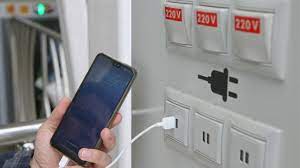
what is Juice Jacking SCAM

  Juice Jacking is a cybersecurity threat that occurs when cybercriminals manipulate public charging stations, such as USB charging ports in...